Three Q's to ask yourself when buying an App
1. Does this really solve a problem without creating a new one?
2. What is the refund policy?
3. Will this give me any edge, or extra time, as opposed to less?

The Best Apps and Tech for ADHD. No Distractions.
Showing posts with label apps. Show all posts
Showing posts with label apps. Show all posts
Sunday, May 27, 2012

Friday, May 25, 2012
For my Point of Care Pros and Clinicians!

Dragon Medical 360 | Mobile Recorder
With Dragon Medical 360 | Mobile Recorder, clinicians can use their smartphones or tablets to dictate at the point of care. Their high-quality audio recordings are then sent to a Nuance Healthcare background speech platform, enabling rapid and accurate documentation.
Clinicians using Dragon Medical 360 | Mobile Recorder save time when dictating, increase report accuracy, and improve document turnaround times. Furthermore, online app store and market installation minimizes demand on IT resources.
Dragon Medical 360 | Mobile Recorder delivers:
- Clinician convenience and satisfaction
- Clinician time-savings
- Improved documentation accuracy
- Improved documentation times
Does anybody have experience with this specific app? What do you think of it? I know a lot of clinicians who are interested in this technology, but I have never used this myself, so I am trying to get a good picture of how this works.
Monday, May 14, 2012


Thursday, April 26, 2012
Have too many passwords?

Basically, 1Password creates strong, very unique passwords for you, remembers them, and uses them exactly when you need them. All while keeping all data encrypted with a complex algorithmic key. You will only have 1 password to remember after you start using 1password!
or

Basically, 1Password creates strong, very unique passwords for you, remembers them, and uses them exactly when you need them. All while keeping all data encrypted with a complex algorithmic key. You will only have 1 password to remember after you start using 1password!
This post is dedicated to Mungo. Why Mungo? For all the entertainment he brings to all, of course, plus these 3 things:
1. Security App
2. Android
AND
3. This app is made by a Toronto-based private company.
-Mark K. www.ADHDApps.me
Tuesday, April 10, 2012
MindNode - Easy mind mapping.


Here is my video review of MindNode:

 |
| An Example of a Social Media Strategy started in MindNode |
Thursday, March 8, 2012
The Top 10 iPad Apps for ADHD

1. Keynote

Keynote makes it truly easy to create and send lovely presentations/reports/etc. on your iPad. Choose from elegantly designed themes. Customize the graphics any way you like. Add photos, movies, and more. Dramatize your presentations or .pdfs with animated transitions and effects. Everything looks even more impressive when you present full screen on iPad.


MindNode's focused flexibility makes it the perfect brainstorming tool. The clutter-free interface lets you concentrate on generating and connecting your ideas, and an infinitely expanding canvas means that no matter how big or complicated your thoughts get, MindNode can keep up. This is one of my favorite Apps for coming up with ANYTHING that has to do with planning. I know you will love it!
@ADHDapps #ADHDTip MindNode can even automatically rearrange especially complicated mind maps to make them easier to read.

Skitch is the amazingly fun and kinda, surprisingly, powerful app to move your ideas and projects forward using this very natural feeling User Interface.
With Skitch, annotate and draw on just about anything that you see, whether it’s a new or existing photo, a webpage, screenshot, map, or a blank canvas. Then, share your work with friends, colleagues or save it all to Evernote. This is perfect for ADHDers projects and anybody who uses Evernote at all. I highly recommend this app to any of my ADHDer Business owners.
4. Evernote

Evernote is an amazing app that I will continue to rave about until EVERYONE hears me! Just to go www.Evernote.com and see what I am talking about! It basically lets you remember everything you want to. As an ADHDer, this is so important. As a businessman, it is even more-so.
5. Hootsuite

Hootsuite is a godsend for ADHDers that operate a business or a blog and twitter account, or any type of multiple social networking solution. It provides amazing features and allows you to publish as many tweets, blog, Facebook posts in advance as you want!
6. Reminders

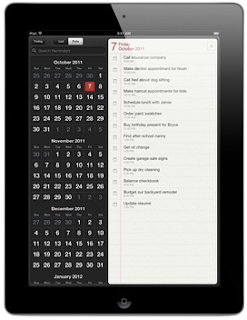
Forgetting happens way too often in our world, so this built-in iPad App helps you remember times, give you 15 minutes to prep for a meeting you totally forgot about, the to do that never gets written down or done. With Reminders, you can create a list of have-to-dos, want-to-dos, or whatever you want. Set a due date, OR a location(like your house) and Reminders notifies you when you hit the date or are at the location.
I have a funny story about this feature: When I first got my iPhone 4S, I had set a reminder via Siri to "grab a gift when I get to my house". I obviously forgot I did this, so 2 weeks later, it FINALLY dawned on me why every-time I drove back to my house it would remind me to grab a gift! LOL. Total hand to the head moment.


I can already hear you guys and girls saying it. "We KNOW it has a mail program! DUH" And those sentiments are appreciated, of course, but the reason I think the iPad Mail app is so powerful, is because I think it is the single greatest email viewing situation I have ever come across. Apparently the rest of the world agrees with me as this app was the most preferred for ANY user of ANY system and ANY email program and combinations within.
8. iTunes U(this is going to be the game-changer for education)


So, it's the world’s largest online catalog of free education lectures, videos, books, and more, from the most reputable organizations in the world....and all easily accessed via the iTunes U app on your iPad!
I am doing a short video about this whole platform, so....keep your eyes open(that didn't really make sense. sorry. lol.)!
9. Bento

This is brilliantly put -"This app helps you think INSIDE the box. Organize contacts, track projects, plan events, and manage all the busy details of your life. With easy-to-use templates that you can customize the way you like, your tasks and to-dos are arranged just so."

Using Pages on iPad is an amazing experience! Pages will let you create beautiful letters, flyers, reports, invitations, and every other kind of document RIGHT on the iPad. Simply put, this app will revolutionize and make you question your need to even use a computers's word processor.
9. Bento
Using Pages on iPad is an amazing experience! Pages will let you create beautiful letters, flyers, reports, invitations, and every other kind of document RIGHT on the iPad. Simply put, this app will revolutionize and make you question your need to even use a computers's word processor.
Tuesday, February 14, 2012
Brain Trainer and Lumosity.com


 |
| Click for Android |
 |
| Palm Pre |
Brain Trainer is a game based mind training app that has 20 million people using it.
I personally have used it for approx. 4-5 months and was able to track the increase in my abilities in specific areas through their unique gaming system. I see a great possibility with this organization. I personally would like to purchase both iLs and lumosity to combine their knowledge and passion into several niche applications, but that is an idea for another day, another blog, and another dream:)
This is not the end all be all ADHD-specific cognitive training program that I perhaps had assumed it was, HOWEVER, it did help me see which areas I needed to improve upon as well as helping me improve on those areas.
It is clean and very ADHD-friendly visually as well.
-Mark K.
Monday, January 23, 2012
MindNode for PROJECTS

Here are some screenshots of a project I am currently working on that would never have progressed this far without Mind Node. Definitely a #superADHDfriendly
app. This visually organized "whiteboard" lets you add any documents(JPEGs, PDFs, .DOC, etc...) right into the "Mind Map".
-Mark K.


 |
| The GiftsKidsLove.org Outline view option. |
 |
| Start New Mind Map. |
 |
| See the new Mind Map in MindNode |
Subscribe to:
Posts (Atom)